Stop Checking Boxes: What a Real KYB License Look-Up Should Cover
Stop Checking Boxes. Start Checking Risk.
Most KYB tools will tell you a business exists. Maybe even that it isn’t on a sanctions list. That’s nice.
But being real isn’t the same as being legal.
An LLC may appear active on paper, but still operate with a revoked contractor license. A vendor might show a valid address while missing five municipal permits. A match isn’t verification. A PDF isn’t protection.
✔️ That’s why we built TrustLayer’s KYB License Look-Up — for the teams that need more than a checkmark.
This tool doesn’t just confirm a company exists. It confirms that it’s legally allowed to operate in the way it claims.
That means license validation, permit checks, business registration status, and signs of financial distress.
All verified.
All human-reviewed.
All in one place.
Because what you don’t check now… is precisely what you’ll have to explain later.
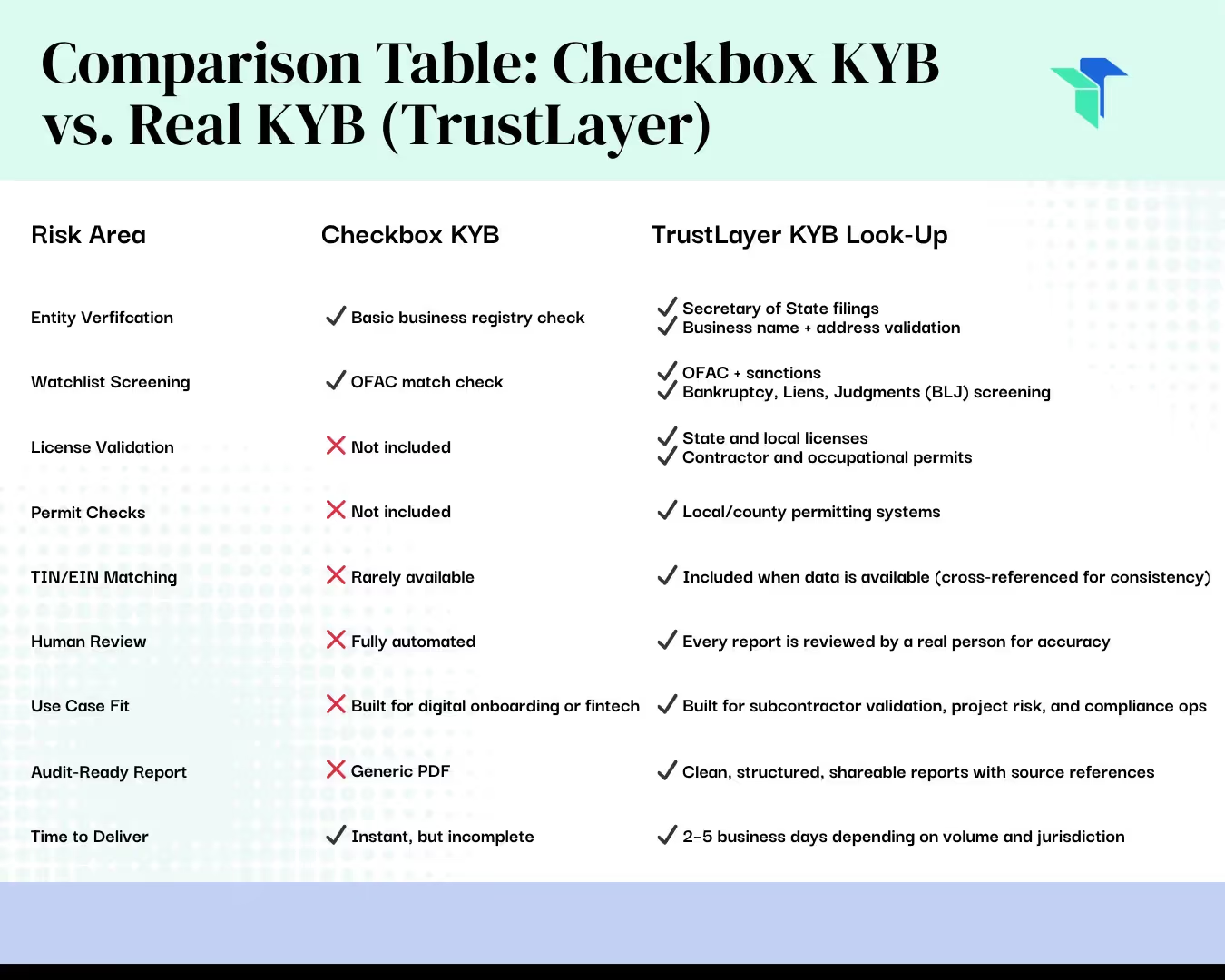
What’s Actually Inside the TrustLayer KYB License Look-Up
✔ 1. License & Permit Verification
• State, local, and industry-specific license checks.
• Contractor permits and regulated credentials.
• Expiration status and upcoming renewal alerts.
✔ 2. Entity Validation
• Secretary of State status.
• EIN and TIN match attempts (when available).
• Registered name, legal status, and address alignment.
✔ 3. Risk Checks
• Bankruptcy, lien, and judgment history.
• Dissolved or suspended entity activity.
• Watchlist hits, including OFAC and federal sanctions.
✔ 4. Manual QA Review
• All reports reviewed by a real human.
• Source-level cross-validation.
• Clear, shareable output with notes.
Who This Is Built For
This isn’t a fintech onboarding tool. It’s for the people getting blamed when something goes wrong.
✔ Construction: Confirm your subs are licensed and permitted to work.
✔ Insurance: Document diligence to avoid E&O or denied claims.
✔ Procurement: Validate vendors across multiple states and jurisdictions.
✔ Finance: Don’t wire funds to a dissolved LLC.
✔ Franchise Ops: Ensure compliance before greenlighting a new location.
Where We Source Our Data
No single database can give you the full picture — so we aggregate licensing and permit data from multiple trusted sources across government, regulatory, and proprietary systems.
This isn’t “set it and forget it.” It’s “check it before it burns you.”
Why This Matters
As Aaron Reese, TrustLayer’s Product Manager, puts it:
“We’re not trying to catch people. We’re trying to catch mistakes — before they cost someone their job.”
This tool wasn’t built for the checkbox. It was built to address real-world risks, including liability, reputation, delays, and legal exposure. And unlike static dashboards, this one adapts to how vendors actually work across cities, counties, and states.
Why We’re Offering a Beta Version
Right now, we’re offering KYB License Look-Up to a select group of organizations in exchange for honest feedback to help shape the final product.
If you’ve ever Googled a license, checked a Secretary of State site manually, or kept vendor info in a spreadsheet… you’re the reason we built this.
This beta is already serving:
✔ National builders launching new project risk workflows.
✔ Franchise compliance leads overseeing multi-jurisdictional licenses.
✔ Commercial real estate partners screening contractors.
✔ Brokers looking to prevent E&O.
How the Beta Works
✔ You send us a list of one or more vendors.
✔ TrustLayer runs a full KYB License Look-Up.
✔ You get a clean, verified, human-reviewed report.
✔ You tell us what worked — and what you wish it included.
Frequently Asked Questions
Q: How long does it take?
Most reports are delivered within 2–3 business days, depending on vendor list size and complexity.
Q: Is it fully automated?
No. And that’s a feature, not a bug. Every report is reviewed by a trained TrustLayer analyst.
Q: Who’s this for?
Anyone responsible for risk, compliance, procurement, vendor onboarding, or insurance accuracy.
Q: Where do I start?
Schedule a demo or learn more here.
✔ Stop trusting PDFs that just say “Business Found.”
✔ Get ahead of missed permits, expired licenses, and dissolved entities.
✔ Show your stakeholders what real diligence looks like.
You might also like
.png)