ResourcesViewpoint Vista Insurance Compliance: How TrustLayer Connects Vendors, Projects, and COI Status
Viewpoint Vista Insurance Compliance: How TrustLayer Connects Vendors, Projects, and COI Status
Your construction team already maintains vendors, jobs, contacts, and commitments in Viewpoint Vista.
Insurance compliance shouldn’t require rebuilding all of that information somewhere else.
TrustLayer’s native integration with Viewpoint Vista connects the construction records your team already maintains with a dedicated insurance compliance workflow. Vendors, contacts, projects, and eligible commitments can flow from Vista into TrustLayer, where insurance documents are collected, evaluated, and monitored.
Mapped compliance results can then be sent back to Vista for the teams working there.
The goal is simple: reduce duplicate setup, keep compliance connected to the work, and give teams better information before work begins or payment is released.
Quick Answer: What Does the TrustLayer + Viewpoint Vista Integration Do?
TrustLayer connects directly to Trimble’s Vista API.
Vista remains the system of record for construction operations, while TrustLayer serves as the compliance engine for document collection, coverage evaluation, expiration monitoring, and follow-up.
The integration can:
- Import eligible AP vendors from Vista as parties in TrustLayer
- Import eligible PM Firm Contacts as party contacts
- Import eligible JC jobs as TrustLayer projects
- Use subcontracts and eligible job-linked purchase orders to associate vendors with projects
- Automatically add qualifying projects and vendors based on configuration
- Send mapped compliance results back to Vista at the vendor or project level
This is a direct, native integration built on Trimble’s Vista API without a third-party aggregator between TrustLayer and Vista.
TrustLayer + Viewpoint Vista Integration Snapshot
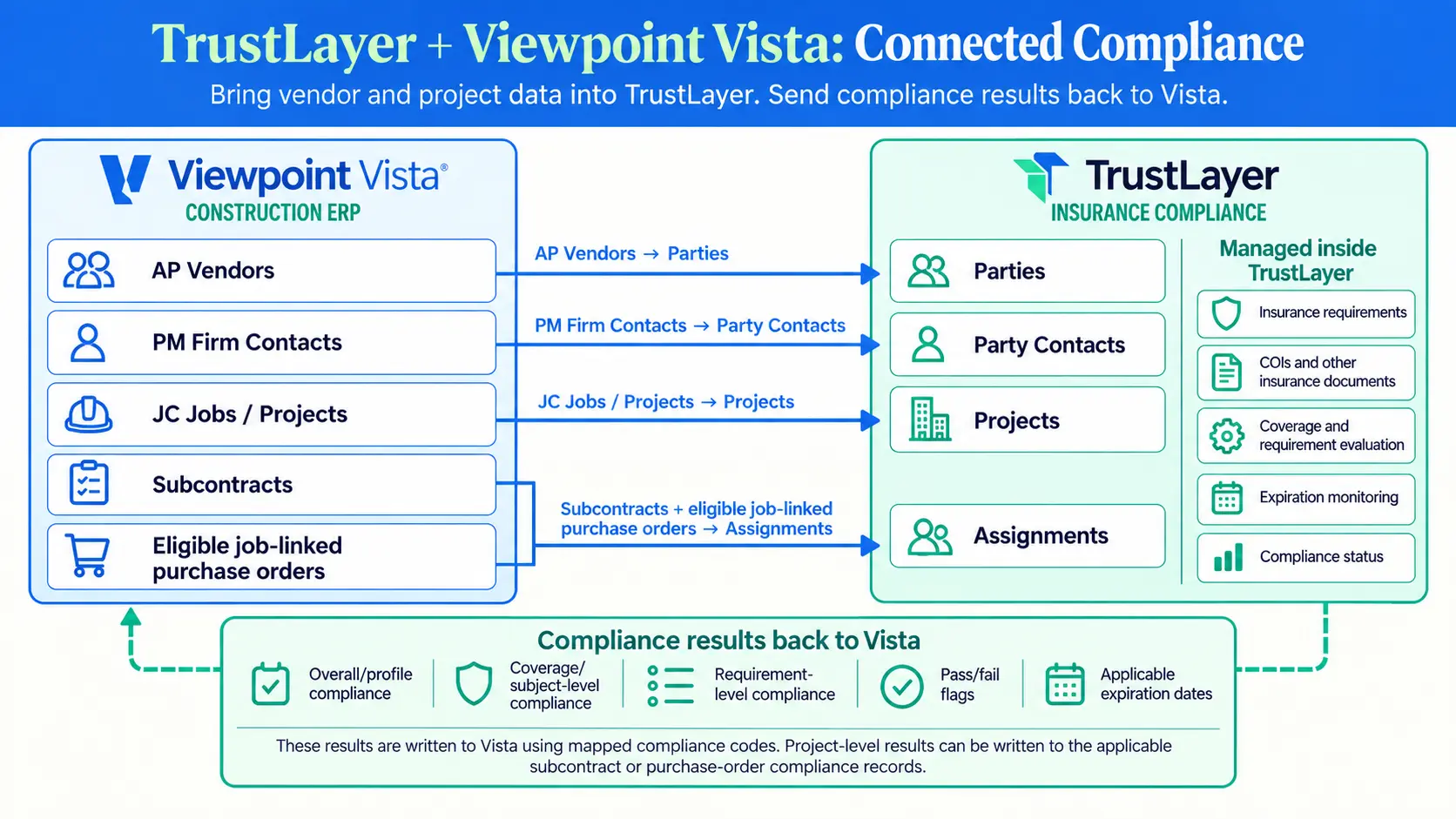
How the TrustLayer + Viewpoint Vista Integration Works
1. Bring Vista Records Into TrustLayer
Your team shouldn’t have to rebuild vendor and project records just to begin managing insurance compliance.
TrustLayer can import eligible Vista vendors, company-level contacts, and jobs. During setup, teams can choose whether to import a record, link it to an existing TrustLayer record, or exclude it. Exact name matches can be linked rather than duplicated.
By default, active vendors and open jobs are eligible for sync, although filters and automation settings can be adjusted to match the customer’s Vista environment and workflow.
The result is a cleaner starting point with less duplicate setup and manual data entry.
If collecting insurance documentation during onboarding is still heavily manual, see how to automate COI intake for vendor onboarding.
2. Connect Vendors to the Projects Where They Work
Insurance requirements aren’t always the same everywhere a subcontractor works.
A vendor may meet the requirements for one project while another project requires different limits, coverages, or documentation.
TrustLayer uses eligible Vista commitments to create party-project assignments. Supported commitments include subcontracts and purchase orders linked to a job at the purchase-order header level.
When a qualifying commitment connects a vendor with a project, TrustLayer can associate that relationship with the appropriate compliance workflow.
That project-specific approach matters because insurance requirements can change based on the project, phase, location, or scope of work.
For a deeper look at this model, see Multi-Request Workflows: Coverage by Project, Phase, or Site.
3. Manage Insurance Compliance in TrustLayer
Once the appropriate vendors and projects are connected, TrustLayer manages the insurance compliance workflow.
TrustLayer can:
- Request COIs and supporting documents
- Allow vendors to submit documents without creating a TrustLayer login
- Read submitted insurance documents using AI-assisted verification
- Check coverage against the customer’s requirements
- Flag gaps and exceptions for review
- Monitor expiration dates
- Automate reminders and follow-up
That means less time opening documents line by line, chasing vendors through email, and manually updating spreadsheets. Human teams can spend more of their time reviewing exceptions and making the decisions that actually require judgment.
For organizations managing hundreds or thousands of third parties, see how to automate COI tracking for large vendor networks.
4. Send Compliance Results Back to Vista
Collecting and evaluating insurance is only useful if the people making operational decisions can see the result.
TrustLayer sends mapped compliance results back to Vista using compliance codes.
Those results can be configured at three levels:
Profile level: Is the vendor compliant overall?
Subject level: Is a coverage such as Commercial General Liability compliant?
Requirement level: Does an individual requirement, such as a $1 million each-occurrence limit, meet the standard?
Vista compliance codes can be flag-based or date-based. Flag codes can communicate a pass/fail result, while date-based codes can carry an applicable expiration date.
Compliance can also be written back globally at the vendor level or at the project level through the appropriate subcontract or purchase-order compliance records.
The result is clearer compliance visibility for operational teams without requiring every Vista user to work directly inside TrustLayer.
If your bigger question is simply “Are my vendors actually compliant?”, our guide to understanding vendor compliance breaks down what teams should be looking for beyond simply having a certificate on file.
What Gets Synced?
Viewpoint Vista → TrustLayer
Depending on configuration and eligibility filters, TrustLayer can receive:
- AP vendors
- Vendor name, address, and website
- Eligible company-level PM Firm Contacts, including name, phone, and email
- JC jobs and available project information
- Subcontracts
- Eligible job-linked purchase orders
- Vendor-project relationships created from those commitments
Project-level contacts are not supported. Sub-jobs are not included in the standard project sync, and project start and completion dates are not directly available from the primary Vista project record.
TrustLayer → Viewpoint Vista
Depending on the selected mapping and sync settings, TrustLayer can send:
- Overall vendor compliance
- Coverage- or subject-level compliance
- Requirement-level compliance
- Pass/fail flags
- Applicable expiration dates
- Global vendor-level compliance
- Project-level compliance associated with eligible commitments
TrustLayer doesn’t replace the operational information maintained in Vista. It returns the compliance results teams need to the appropriate Vista records.
What This Changes for Construction Teams
Risk and Compliance
Start with vendor, project, contact, and commitment information already maintained in Vista.
Then use TrustLayer to collect documents, evaluate coverage, track expirations, and manage follow-up while focusing human attention on the exceptions that actually need review.
Accounts Payable
See mapped compliance results in Vista before releasing payment instead of checking a separate spreadsheet, searching an inbox, or asking another department for an update.
Project Teams
Get clearer visibility into whether a subcontractor meets the requirements associated with the project and commitment where the work is happening.
Procurement and Vendor Management
Reduce the gap between creating a vendor or commitment and beginning the appropriate insurance workflow.
Leadership
Create a more connected view of third-party compliance while reducing manual reconciliation between systems.
Construction teams are already moving beyond fragmented, spreadsheet-based insurance tracking. See how Standard Construction used TrustLayer to improve subcontractor compliance visibility.
Why the Native Vista Integration Matters
The TrustLayer integration connects directly to Trimble’s Vista API.
That removes the third-party aggregation layer previously used for the Vista connection and gives TrustLayer a native path for reading eligible Vista records and returning compliance results.
The relationship is intentionally straightforward:
Vista is the system of record for vendors, jobs, contacts, and commitments.
TrustLayer manages insurance compliance, including document collection and coverage evaluation.
Mapped compliance results return to Vista so operational teams have access to them where they already work.
This is not a full two-way synchronization of every field across both platforms. It is a purpose-built exchange of construction context and insurance compliance results.
The goal isn’t to replace Vista. It’s to connect the operational information already living there with the compliance workflows TrustLayer is built to manage.
Before You Connect Vista and TrustLayer
Trimble API Access
The customer must request a third-party API key for TrustLayer through the Trimble customer portal or their Trimble Construction One representative.
The connection also uses the customer’s Vista subscriber code.
Depending on the enabled workflow, required resources typically include:
- AP Vendors and Vendor Compliance
- PM Projects, Contracts, Firms, and Firm Contacts
- SL Subcontracts and Compliances
- PO Purchase Orders and Compliances
- HQ Compliance Codes
- Applicable AP, PM, JC, SL, and PO company-parameter resources
For on-premise Vista environments, the Trimble Xchange Agent must be installed and able to access the Vista database.
Compliance Code Mapping
The customer and TrustLayer determine which TrustLayer results map to which Vista compliance codes.
That includes selecting the appropriate level of detail—profile, subject, or individual requirement—and determining whether each Vista code should be flag-based or date-based.
TrustLayer Configuration
Configuration can include:
- Default party type
- Default compliance profile
- Compliance format and detail level
- Vendor-level, project-level, or combined write-back
- Project and commitment eligibility filters
- Project-description sync behavior
- Contact synchronization and title filtering
- Automatic project import
Is the TrustLayer + Vista Integration Real-Time?
No. The integration is automated, but updates may not appear instantly.
Vista → TrustLayer
The integration reads from Trimble’s App Xchange cache rather than directly from the live Vista database.
The customer’s Xchange Agent refreshes that cache on a schedule, so new or changed Vista records may take time to appear in TrustLayer.
Vista changes may also need to be posted from their batch before becoming available to the Xchange Agent.
TrustLayer → Vista
Compliance write-back is event-triggered.
TrustLayer briefly groups related changes before submitting an update to Trimble’s processing queue. Vista then needs to accept and process the queued action before the updated compliance result is final.
The integration removes manual re-keying, but teams should still allow for processing time in both directions.
Important Vista Data Considerations
A few details are worth understanding before configuration:
- Vendor, project, and commitment eligibility depends on configured filters
- By default, active vendors and open jobs are eligible for sync
- Sub-jobs are not included in the standard project sync
- Only eligible company-level PM Firm Contacts are supported
- Project-level contacts are not supported
- Contact imports require a usable name and email address
- Multiple qualifying commitments can create separate assignments in TrustLayer
- Purchase orders must be linked to the job at the header level to be retrieved reliably
- Each Vista compliance code is either date-based or flag-based; one code cannot carry both
- Compliance write-back can be enabled or disabled and scoped to vendor-level, project-level, or applicable compliance
- App Xchange cache refreshes and queued Vista writes can introduce processing delays
TrustLayer’s implementation team can help align these settings with your Vista configuration and compliance process.
Frequently Asked Questions
Q: Does TrustLayer integrate with Viewpoint Vista?
Yes. TrustLayer offers a direct, native connection to Trimble’s Vista API for importing eligible construction records and returning mapped insurance compliance results.
Q: What Vista data can TrustLayer import?
TrustLayer can import eligible AP vendors, company-level PM Firm Contacts, JC jobs, subcontracts, and job-linked purchase orders. Commitments are used to associate vendors with projects.
Q: Can TrustLayer send compliance results back to Vista?
Yes. TrustLayer can write mapped compliance results to Vista using compliance codes at the vendor or project level.
Q: How detailed can Vista compliance mapping be?
Compliance can be mapped at the overall profile level, individual coverage or subject level, or specific requirement level.
Q: Does TrustLayer replace Vista?
No. Vista remains the system of record for construction operations. TrustLayer manages the insurance compliance workflow and returns mapped results to Vista.
Q: Can new Vista projects and vendors be added automatically?
Yes, when configured. New projects can be added automatically after becoming available through App Xchange. Vendors can also be imported and associated with a linked project when a qualifying commitment is created.
Q: Are purchase orders supported?
Yes. Eligible job-linked purchase orders can create vendor-project assignments. A purchase order whose job exists only on its line items may not be available through the Vista API.
Q: Do vendors need a TrustLayer login to submit documents?
No. Vendors can provide requested documents without creating a TrustLayer account.
Q: Is the integration real-time?
No. The workflow is automated, but Vista cache refreshes and queued write processing can introduce delays.
Keep Compliance Connected to Construction Operations
Your vendors, jobs, contacts, and commitments already exist in Vista.
TrustLayer connects that construction context to a dedicated insurance compliance workflow, then returns mapped compliance results to the system where operational teams already work.
Construction context moves into TrustLayer. Compliance visibility moves back to Vista.
Using another construction ERP? See how the TrustLayer + CMiC integration connects vendor, project, subcontract, and compliance information across the two systems.
Ready to see how TrustLayer can connect insurance compliance to your Viewpoint Vista workflow?
You might also like